| Support Category: Course Information Inquiry |
| Specialist Notes: |
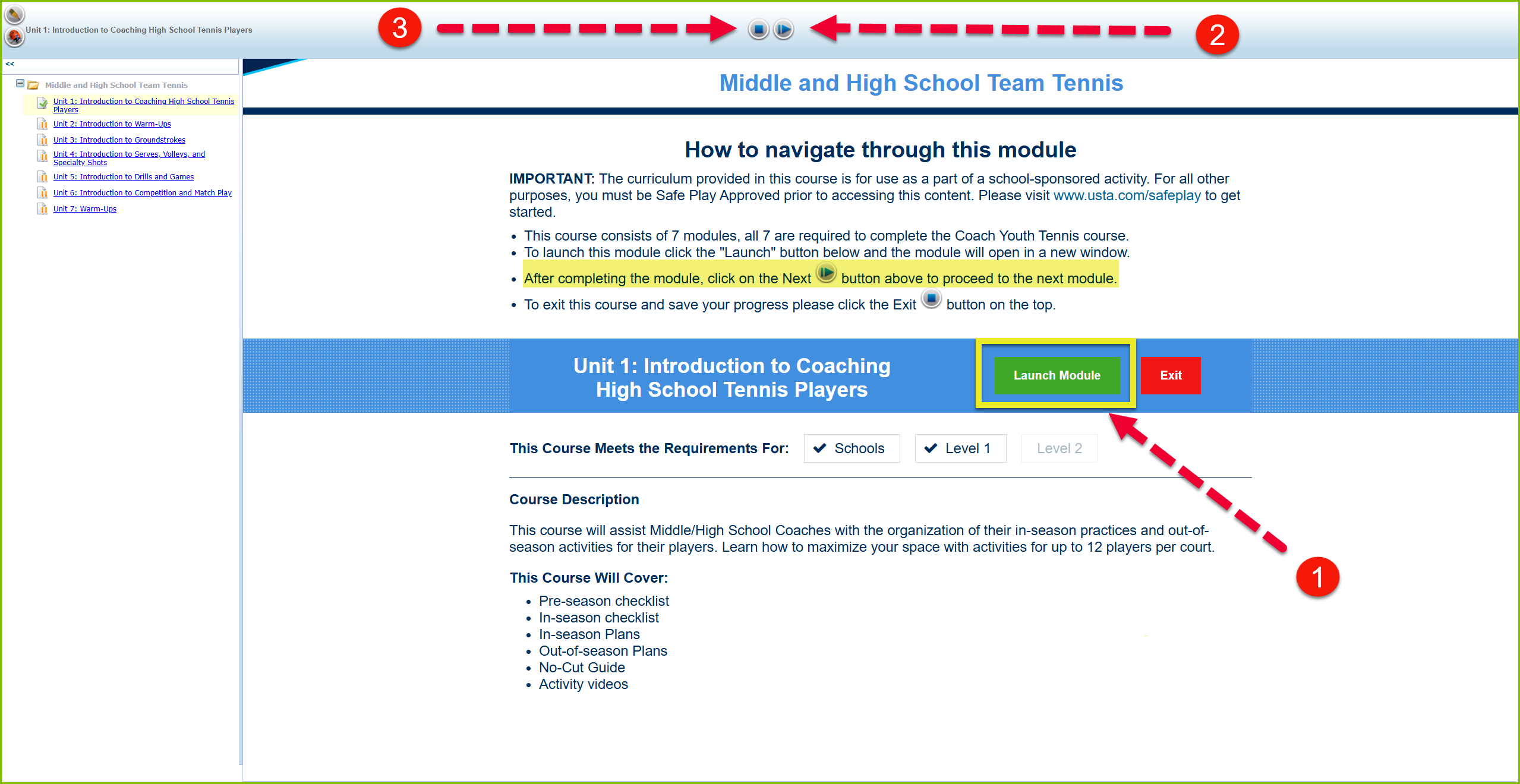
When a user clicks the 'LAUNCH' button from the Catalog, they will be taken to a course navigation page where there will be a guide to navigate the course and a 'Launch Module' button which will open the module on a different window.
This specific course contains multiple modules, which will be displayed on the left side of the screen.
After completing a module, the users may navigate to the next module by clicking on the Next button or by selecting from the module list on the left side of the course navigation page and clicking 'Launch Module'.
When the user completes all the modules, they may properly exit the course by clicking the 'Exit' button.
The certificates for the individual modules should be available individually as well.
| Standard Response: |
The Middle and High School Teams course contains multiple modules. Please ensure you complete all of them in order for the course to be marked as completed.
1. To launch the modules, kindly click the "Launch Module" green button. The module will open in a new window.
2. After completing the module, please click the "Next" button (Forward arrow) to proceed to the next module. You may also navigate to the next module by selecting from the menu on the left side of the course navigation page.
3. To exit this course and save your progress, please click the "Exit" button (Square) at the top of the course navigation page.